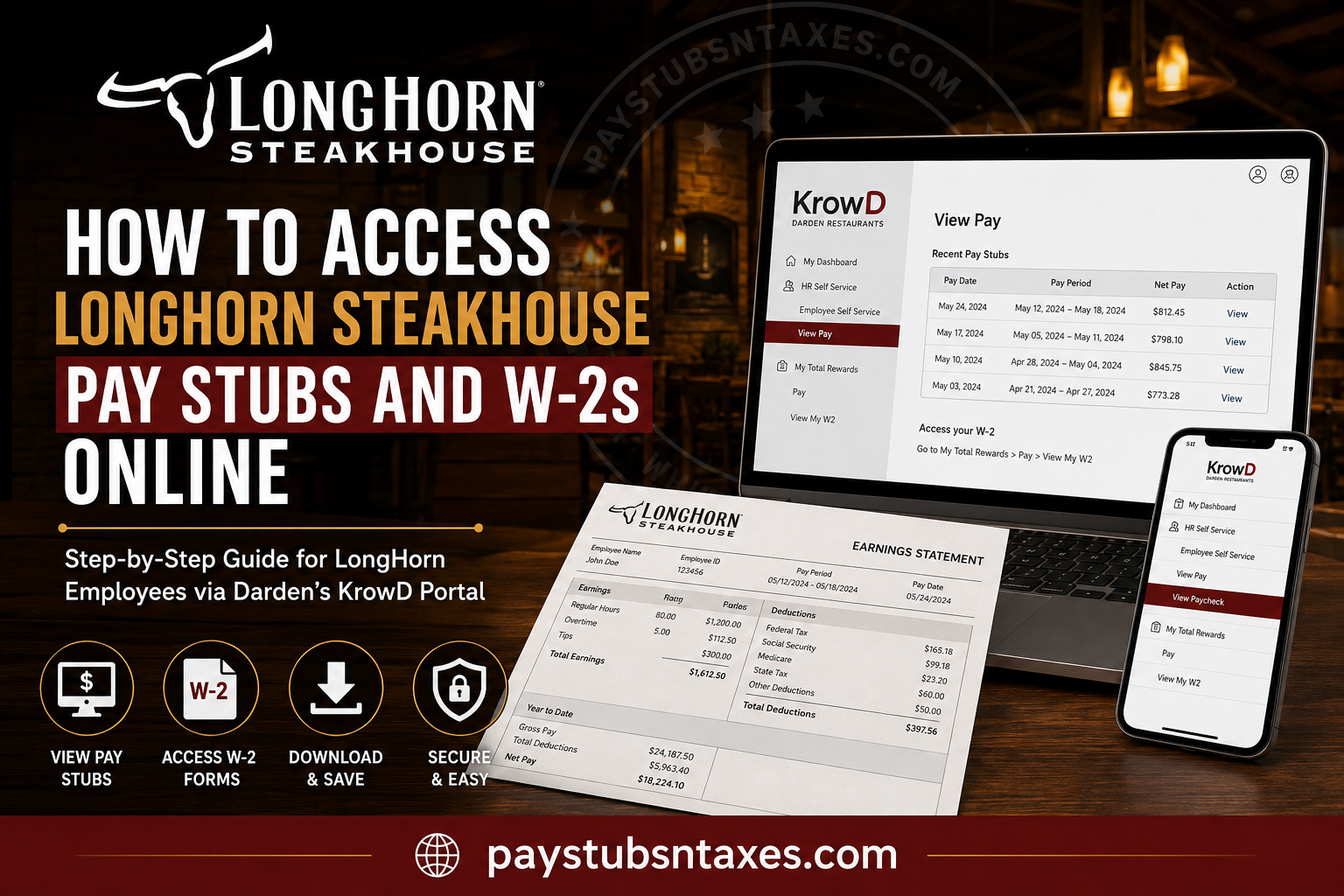
LongHorn Steakhouse team members can access their pay stubs and W-2 tax forms through KrowD, Darden Restaurants’ employee intranet. Whether you need to verify your weekly earnings, review payroll deductions, apply for a loan, or prepare your annual tax return, KrowD brings the essential documents under one digital roof. RARE Hospitality Management, LLC, doing business as LongHorn Steakhouse, is part of the Darden Restaurants family. LongHorn’s payroll is therefore administered through Darden’s payroll system, while employee pay and tax records are made available through KrowD and My Total Rewards. This guide explains how to find, view, download, and print your LongHorn Steakhouse pay stubs and W-2s online.
What Is the KrowD Employee Portal?
KrowD is Darden Restaurants’ internal employee portal. It serves as a central gateway through which eligible team members can access payroll information, tax documents, benefits resources, personal details, company news, and other employment-related services.
You can reach the portal through either of the following official addresses:
- https://krowd.darden.com
- https://auth.krowd.darden.com/auth/transmit-sdk/
Because payroll and tax records contain sensitive personal and financial information, always confirm that you are using an official Darden website before entering your credentials.
How to Access LongHorn Steakhouse Pay Stubs Online
LongHorn Steakhouse employees are generally paid weekly on Friday. Once a paycheck has been processed, its corresponding pay stub can be viewed through KrowD.
Accessing a pay stub through the KrowD website
Follow these steps on a desktop computer, laptop, tablet, or mobile browser:
- Visit https://krowd.darden.com.
- Enter your KrowD username and password.
- Select HR Self Service.
- Open Employee Self Service.
- Select View Pay.
- Choose the paycheck or pay period you want to review.
- Open the pay-stub details.
- Select the available download or PDF option to save or print the document.
Your paycheck history may extend back several months. If numerous pay periods appear, use the available filters to narrow the list by date or week. After selecting the relevant pay period, look near the bottom of the paycheck-details page for the PDF download option.
Accessing a pay stub through the KrowD mobile app
The mobile app offers a more direct route:
- Sign in to the KrowD mobile app.
- Select View Paycheck.
- Tap View Details.
- Choose the appropriate pay week.
- Review the paycheck information or select the available option to download the pay stub as a PDF.
Menu names may vary slightly after an application update. If View Paycheck is not immediately visible, look under the pay, payroll, or employee self-service section.
How to Download or Print a LongHorn Pay Stub
After opening the required pay period, locate the PDF, Download, Print, or similarly labelled option. On some versions of the portal, the link appears near the lower-right corner of the paycheck details.
Once the PDF opens, you can:
- Save it to a secure device or encrypted folder
- Print a paper copy
- Attach it to a loan, rental, or income-verification application
- Retain it for personal financial records
Avoid saving payroll documents on a public computer or shared device. If you must use one, sign out of KrowD completely, close the browser, and remove any downloaded copies before leaving.
How to Access a LongHorn Steakhouse W-2 Online
Your W-2 reports your taxable wages and the taxes withheld from your earnings during the calendar year. LongHorn Steakhouse employees can generally retrieve available W-2 forms through the My Total Rewards section of KrowD.
Follow these steps:
- Go to https://krowd.darden.com.
- Sign in using your KrowD credentials.
- Select My Total Rewards.
- Choose Pay.
- Select View My W-2.
- Choose the required tax year.
- Open, download, or print the W-2.
Saving an electronic copy in a secure location can be invaluable if the original is misplaced or if you need to amend a tax return later.
Historical UKG Pay Stubs and W-2s
During the payroll transition that began on December 25, 2023, employees’ personal information—including home addresses, direct-deposit instructions, and banking details—was transferred to Darden’s payroll system. The first paycheck under that transition was issued on January 5, 2024, with pay-stub access beginning January 3, 2024.
Access to historical documents in the former UKG system was scheduled to remain available only through May 2024. Consequently, current employees seeking recent LongHorn pay stubs or Darden-issued W-2s should begin with KrowD.
If an older document is unavailable online, contact the Total Rewards Service Center for guidance rather than repeatedly attempting to use an expired or inactive UKG account.
What to Do If You Cannot Log In to KrowD
If KrowD will not accept your credentials, consider the following checks:
- Confirm that your username and password have been entered correctly.
- Make sure Caps Lock is not enabled.
- Use the official KrowD website rather than an unverified third-party link.
- Try the portal in an updated browser.
- Clear outdated browser cookies and cached data.
- Attempt to sign in from another trusted device or network.
- Use the password-recovery option if one is available.
- Contact your manager if you have not received or activated your employee credentials.
For a technical access problem, you may also contact Darden’s My Service Desk at 800-551-2444.
How to Obtain Employment or Income Verification
A pay stub may be sufficient for some applications, but lenders, landlords, government agencies, and other organizations occasionally require formal income or employment verification.
Within KrowD, try the following path:
KrowD > My Total Rewards > Pay > View My Income
Follow the instructions provided there to obtain the appropriate verification record or service.
Important Security Tips
Your pay stubs and W-2s contain confidential information that could be exploited for identity theft. A little caution goes a long way:
- Never share your KrowD password with another person.
- Do not send a complete W-2 or pay stub through unsecured messaging services.
- Avoid accessing payroll records over public Wi-Fi.
- Verify the recipient before submitting an income document.
- Store downloaded files in a secure, password-protected location.
- Sign out after every session, particularly on a shared device.
- Be wary of emails or text messages requesting banking details, tax information, or login credentials.
Darden or LongHorn support representatives may help you navigate the portal, but you should never disclose your full password.
LongHorn Steakhouse Payroll and Benefits Contacts
If the online instructions do not resolve your concern, use the contact that best matches the nature of your question:
- General Total Rewards assistance: 855-201-7638
- Total Rewards email: totalrewards@darden.com
- Benefits and payroll-related assistance: 888-374-3343
- Employment questions or workplace concerns: 800-932-2558
- KrowD or other technical issues: 800-551-2444
Before calling, have your employee information and the relevant pay period readily available. However, never send passwords, complete banking details, or an unredacted Social Security number by ordinary email.
Final Thoughts
Accessing a LongHorn Steakhouse pay stub or W-2 online is usually straightforward once you know where to look. For pay stubs, sign in to KrowD and open HR Self Service > Employee Self Service > View Pay. For W-2 forms, navigate to My Total Rewards > Pay > View My W-2. Download important records while they are available, store them securely, and examine each pay stub carefully. Should the portal place an obstacle in your path, your manager, My Service Desk, and the Total Rewards Service Center can help you get back on track.
Frequently Asked Questions About LongHorn Steakhouse Pay Stubs and W-2s
1. How do I access my LongHorn Steakhouse pay stubs online?
Current LongHorn Steakhouse employees can access pay stubs by logging in to the Darden KrowD employee portal. After signing in, navigate to HR Self Service → Employee Self Service → View Pay. Select the appropriate pay period to review your paycheck details and, when available, download or print a copy.
2. What is the LongHorn Steakhouse employee login website?
The primary employee portal is https://krowd.darden.com. KrowD is Darden Restaurants’ internal portal and provides employees with access to payroll, HR services, My Total Rewards, company applications, and other employment-related resources.
3. How can I view my LongHorn paycheck on my phone?
Open the KrowD mobile app or mobile portal, sign in with your employee credentials, and select View Paycheck → View Details. You can then choose the relevant paycheck to review your earnings, deductions, taxes, and net pay.
4. Can I download my LongHorn Steakhouse pay stub as a PDF?
Yes, when the payroll system provides the option. Open the paycheck for the appropriate pay period and look for a Download, Print, PDF, or similar option. Saving pay stubs as PDF files can be useful for income verification, loans, apartment applications, tax records, and other financial purposes.
5. How do I access my LongHorn Steakhouse W-2 online?
Log in to KrowD and navigate to My Total Rewards → Pay → View My W2. Select the appropriate tax year to open your W-2. You can then review the form and use the available print or download option to retain a copy.
6. Where can I find previous LongHorn Steakhouse pay stubs?
Available historical paycheck statements can generally be found under KrowD → HR Self Service → Employee Self Service → View Pay. Choose or filter the displayed pay periods to locate an earlier paycheck.
7. What information appears on my LongHorn Steakhouse pay stub?
A LongHorn pay statement may show your pay period, regular earnings, hours worked, applicable overtime or additional earnings, gross pay, federal and state tax withholding, Social Security and Medicare taxes, benefits or other deductions, year-to-date totals, and net pay.
8. What is My Total Rewards at Darden?
My Total Rewards is Darden’s central resource for pay- and benefits-related information. Employees can reach it through KrowD → My Total Rewards. It may contain information concerning pay, W-2 forms, benefits, paid time, employee programs, and other Total Rewards resources.
9. What should I do if I cannot log in to KrowD?
First, confirm that you are using the correct KrowD username and password and that you have reached an official Darden login page. If your account remains inaccessible, use the available password-recovery options or contact Darden My Service Desk at 800-551-2444 for technical assistance.
10. What should I do if my LongHorn pay stub is incorrect?
Review the detailed pay statement and compare the hours, wages, tips or additional earnings, deductions, and taxes with your records. If you still believe there is an error, contact your manager or the Total Rewards Service Center at 888-374-3343 and identify the specific pay period in question.
11. How do I update my address in KrowD?
Current employees can generally update or review personal information by going to KrowD → HR Self Service → Employee Self Service → My Personal Data. Keeping your mailing address and other contact information current is particularly important for payroll and tax-related correspondence.
12. Can former LongHorn Steakhouse employees access KrowD?
Access may change after employment ends. Former employees who can no longer sign in to KrowD should contact Darden’s Total Rewards Service Center at 888-374-3343 for guidance about obtaining previous payroll records or tax documents rather than relying on an old employee login.
13. What should I do if my LongHorn W-2 is missing?
First, sign in to KrowD → My Total Rewards → Pay → View My W2 and make sure you have selected the correct tax year. If the W-2 is still unavailable, contact Darden Total Rewards for assistance. Employees should also make sure their current mailing and contact information is accurate.
14. Who should I contact about LongHorn Steakhouse payroll or W-2 questions?
For payroll, W-2, Total Rewards, or related assistance, employees can contact 855-201-7638 or email totalrewards@darden.com. The Total Rewards Service Center can also be reached at 888-374-3343. For technical KrowD problems, contact My Service Desk at 800-551-2444.
15. Is KrowD the official payroll portal for LongHorn Steakhouse employees?
KrowD is Darden Restaurants’ central internal employee portal and provides access to Darden applications, including Employee Self Service and My Total Rewards. Because LongHorn Steakhouse is a Darden brand, current LongHorn employees use KrowD as the primary gateway for accessing payroll and HR-related resources.
