Lockheed Martin employees can use LMPeople, the company’s employee portal, to access payroll information, review compensation and benefits, retrieve pay statements, and download year-end tax documents. Whether you need a recent pay stub for a loan application or a W-2 form for filing your taxes, the portal places essential employment records within easy reach. The process is generally straightforward, although your login method and document-delivery options may depend on whether you are a current employee, former employee, or retiree. This guide explains how to access Lockheed Martin pay stubs and W-2s online, select the appropriate authentication method, and obtain help when a document is missing or the portal is inaccessible.
What Is LMPeople?
LMPeople is Lockheed Martin’s employee portal for accessing workplace information and selected human-resources services. Current employees can use it to reach payroll and benefits resources, including pay statements and year-end tax documents.
Payroll records contain sensitive personal and financial information; consequently, employees should access the portal only from a trusted device and a secure internet connection. The login system is intended exclusively for authorized users and should not be used on public kiosks or shared computers accessible to the general public.
How to Log In to LMPeople
On a trusted home or personal device, open a supported browser and navigate to the official LMPeople portal:
LMPeople portal: https://www.lmpeople.com
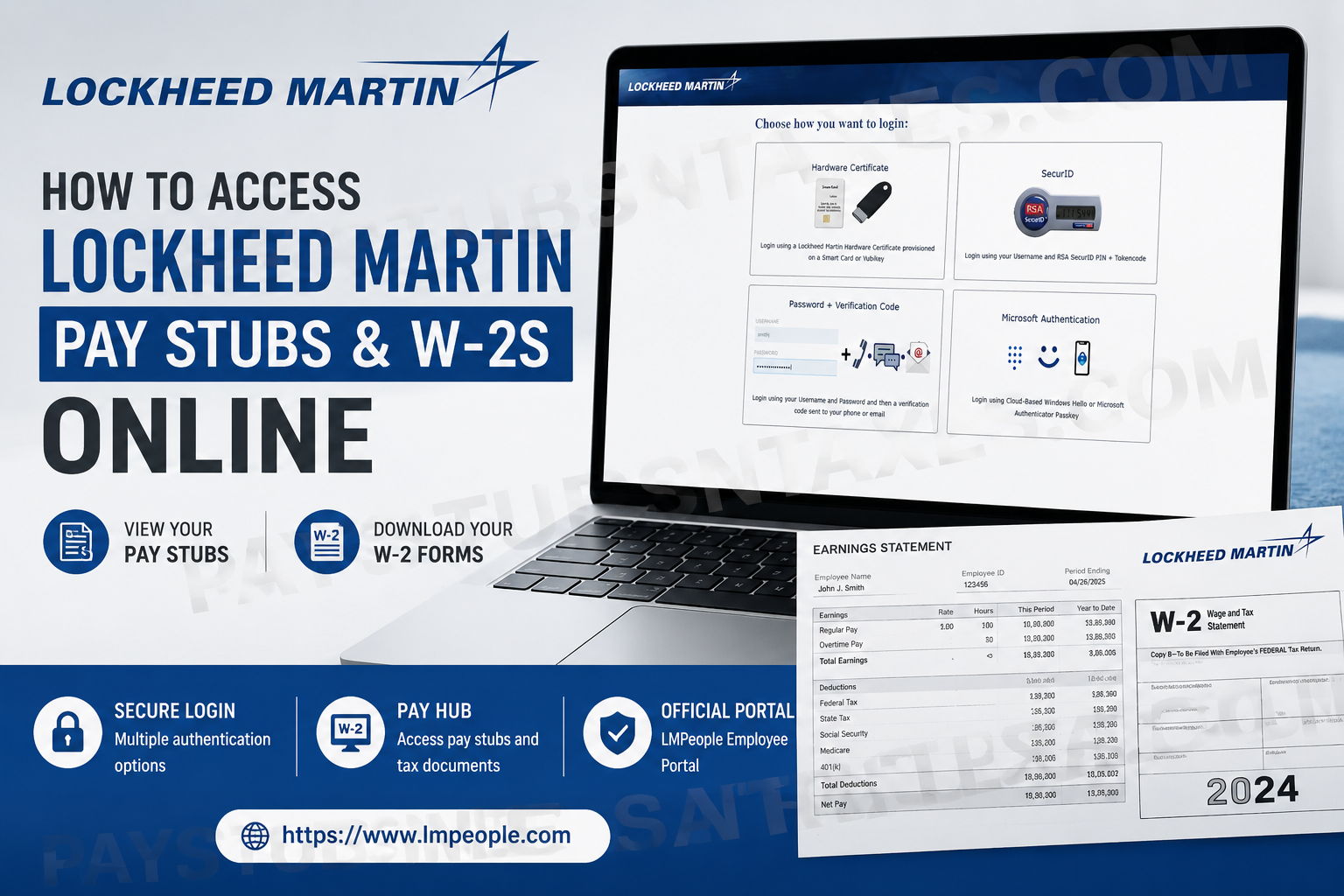
The login page presents four authentication options. Choose the method for which you have already been provisioned by Lockheed Martin.
1. Hardware Certificate
Select Hardware Certificate if you have a Lockheed Martin hardware certificate installed on an authorized smart card or YubiKey.
Connect or insert the appropriate device before beginning the login process, and then follow the on-screen prompts. This option is principally intended for employees who have been issued certificate-based credentials.
2. SecurID
Choose SecurID if your account uses an RSA SecurID token. You will normally need:
- Your username
- Your RSA SecurID PIN
- The token code displayed by your SecurID device
Because token codes change periodically, enter the current code promptly. If the code expires before submission, wait for the next one and try again.
3. Password + Verification Code
Select Password + Verification Code if you sign in with a username and password followed by a one-time verification code.
After entering your username and password, a code may be sent to your registered telephone number or email address. Enter that code when prompted to complete the authentication process. If no code arrives, check that you have reliable mobile or internet service and that your contact details are up to date.
Never disclose a verification code to another person. Legitimate support representatives should not ask you to surrender a live one-time code.
4. Microsoft Authentication
Choose Microsoft Authentication if your Lockheed Martin account has been configured for cloud-based Windows Hello or a Microsoft Authenticator passkey.
Follow the prompt on your registered device and approve the request only after confirming that you initiated it. Reject any unexpected authentication notification, as an unsolicited prompt may indicate that someone else is attempting to access your account.
How to Access Lockheed Martin Pay Stubs Online
Once you have successfully logged in, use the following route:
LMPeople > Pay and Benefits > Pay
Within the Pay hub, look for the section containing your pay statements. The precise labels and page layout may change as the portal evolves, but the payroll area should provide options to view or download available statements.
To retrieve a pay stub:
- Sign in to LMPeople using your authorized authentication method.
- Open Pay and Benefits.
- Select Pay.
- Locate the pay-statement or pay-stub section.
- Choose the relevant pay date.
- Open the statement and select the available download or print option.
- Save the file in a secure location on your personal device.
Lockheed Martin generally follows a bi-weekly payroll cycle, so employees will ordinarily receive a pay statement for each applicable two-week pay period. Payroll arrangements can nevertheless vary by employment category, location, collective-bargaining agreement, or other circumstances; your own pay calendar and statement should therefore be treated as definitive.
How to Access a Lockheed Martin W-2 Online
Current employees can retrieve available W-2 forms from the payroll area of LMPeople. After logging in, follow this path:
LMPeople > Pay and Benefits > Pay
Under the Pay hub, locate the option for year-end tax statements, tax documents, or W-2 forms. Then:
- Select the required tax year.
- Open the W-2 form.
- Verify that your name and other identifying details are correct.
- Download the document as a PDF.
- Store it securely or print a copy for your records.
Before closing the page, confirm that the downloaded file opens correctly and shows the intended tax year. Tax documents contain highly sensitive information, including income and identification data, so they should not be saved on a public device, sent through an unsecured channel, or left in an openly accessible folder.
W-2 Information for Former Employees and Retirees
Former employees and retirees may receive their W-2 forms by mail at the last address recorded in Lockheed Martin’s employee system. If you have moved, updating your address as soon as possible is imperative; otherwise, the form may be delayed or delivered to an outdated address.
Online access may differ according to employment status. Former employees, retirees, and surviving spouses may need to use the credentials and sign-in procedure designated for non-active employees rather than the standard current-employee login.
If you are uncertain whether your address is current or whether online access remains available, contact the Lockheed Martin Employee Service Center before the tax-filing deadline draws near.
How to Get Help With a Missing W-2 or Login Problem
For questions involving W-2 forms, benefits, portal access, or employee-service support, contact the Lockheed Martin Employee Service Center (LMESC).
LMESC toll-free number: 866-562-2363
Mnemonic: 1-866-LMC-2363
Hours: Monday through Friday, 8:00 a.m. to 8:00 p.m. Eastern Time
Additional contact options include:
- Overseas employees: 201-242-4397
- TDD services: 800-TDD-TDD4
- Online assistance: Use the online contact feature after signing in and select Contact Us
Current employees using the online contact feature may be asked to sign in with their LMPeople ID and LMESC password. Non-active employees and surviving spouses may be required to use a Social Security number and password. When calling, have the identifying information required by the service center available, but provide sensitive information only after confirming that you are dealing with the legitimate LMESC channel.
LMESC representatives may be able to assist with:
- A missing or delayed W-2
- An outdated mailing address
- Problems locating a tax document
- Questions about employee or retiree access
- Difficulties using the online contact feature
- Benefits-related enquiries
Technical problems involving a hardware certificate, SecurID token, passkey, or company-managed device may instead require assistance from the Lockheed Martin Service Desk.
Final Thoughts
Accessing Lockheed Martin pay stubs and W-2s online is largely a matter of signing in to LMPeople with the authentication method assigned to you and navigating to Pay and Benefits > Pay. Current employees can use the Pay hub to retrieve payroll statements and available year-end tax documents, while former employees and retirees should keep their mailing details current and contact LMESC whenever access or delivery problems arise. Above all, treat every payroll and tax record with care. By using the official portal, safeguarding your credentials, and downloading documents only to a trusted device, you can obtain the information you need without compromising your personal data.
This article is provided for general informational purposes and is not affiliated with or endorsed by Lockheed Martin Corporation. Portal features, authentication procedures, and employee-service arrangements may change; employees should rely on official Lockheed Martin systems and support channels for account-specific assistance.
Frequently Asked Questions
1. Where can I find my Lockheed Martin pay stubs?
Sign in to LMPeople and navigate to Pay and Benefits > Pay. Open the pay-statement section, select the relevant pay date, and use the available option to view, download, or print your pay stub.
2. How do I download my Lockheed Martin W-2 online?
Visit LMPeople, complete the required authentication, and go to Pay and Benefits > Pay. Locate the year-end tax statements section, select the required tax year, and download the W-2 to a secure personal device.
3. What is the official LMPeople website?
The LMPeople employee portal is available at https://www.lmpeople.com. Enter the address directly into your browser and verify it before providing credentials. Avoid links in unsolicited emails or messages.
4. Which login methods are available on LMPeople?
LMPeople offers four login methods:
- Hardware Certificate
- SecurID
- Password + Verification Code
- Microsoft Authentication
Employees should select the method already assigned to and configured for their account.
5. Can I access LMPeople from my home computer?
Yes, eligible users may access LMPeople from a trusted home or personal device. Use a secure internet connection and avoid public kiosks or shared computers because payroll and tax documents contain sensitive personal information.
6. How do I log in with a Hardware Certificate?
Select Hardware Certificate if Lockheed Martin has provisioned a certificate on your smart card or YubiKey. Connect the authorized device, choose the certificate option, and follow the on-screen authentication prompts.
7. How does the LMPeople SecurID login work?
Select SecurID, then enter your username, RSA SecurID PIN, and the current token code displayed by your device. Because token codes expire quickly, submit the information before the displayed code changes.
8. What is Password + Verification Code authentication?
This method requires your username and password followed by a one-time verification code sent to your registered phone or email address. Enter the current code when prompted and never disclose it to another person.
9. What is Microsoft Authentication on LMPeople?
Microsoft Authentication allows eligible users to sign in using cloud-based Windows Hello or a Microsoft Authenticator passkey. Approve only authentication requests you initiated and reject any unexpected notification.
10. How often does Lockheed Martin issue paychecks?
Lockheed Martin generally operates on a bi-weekly payroll cycle, meaning employees are ordinarily paid once every two weeks. The actual schedule may vary by location, role, employment classification, or collective-bargaining agreement, so employees should consult their own payroll calendar.
11. Can former Lockheed Martin employees access their W-2s online?
Online access may depend on the former employee’s status and available credentials. Former employees who cannot retrieve a W-2 electronically should contact the Lockheed Martin Employee Service Center to confirm their access or document-delivery arrangements.
12. How do former employees receive Lockheed Martin W-2 forms?
A former employee or retiree may receive a W-2 by mail at the last address recorded in the employee system. Anyone who has moved should update their address promptly and contact the Employee Service Center if the form is missing or delayed.
13. Who should I contact if my Lockheed Martin W-2 is missing?
Call the Lockheed Martin Employee Service Center at 866-562-2363, also written as 1-866-LMC-2363. Representatives can assist with missing tax forms, address changes, portal access, and related employee-service questions.
14. What are the Lockheed Martin Employee Service Center hours?
The Lockheed Martin Employee Service Center is available from 8:00 a.m. to 8:00 p.m. Eastern Time, Monday through Friday. Overseas employees may call 201-242-4397, while TDD services are available through 800-TDD-TDD4.
15. What should I do if I cannot log in to LMPeople?
Confirm that you selected the authentication method assigned to your account and entered the correct credentials. Check your token, verification-code delivery, certificate connection, or authenticator device. If the problem persists, contact the appropriate Lockheed Martin employee-service or technical-support channel.
